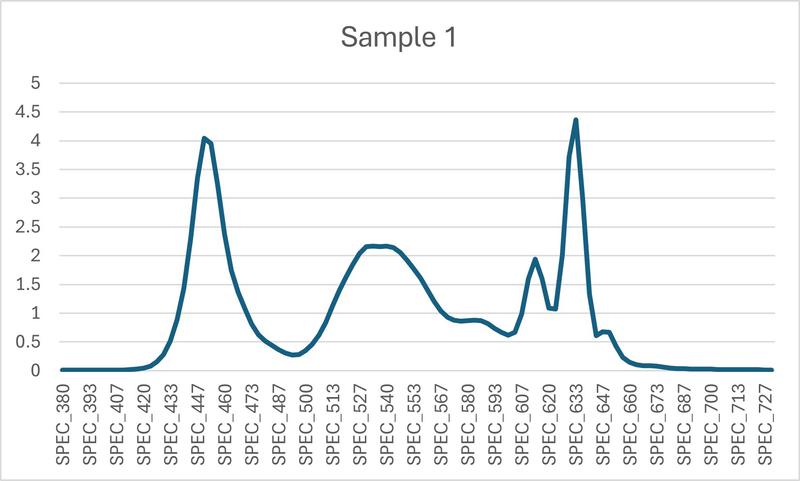
Pwm, Temporal Dithering are not the only triggers.
Suddenly a KSF phosphors monitor with HDR feature could be a main cause for eye strain and many others issues.
After ~2019, almost all manufacturers began adding HDR10 (even if weak) and using 8-bit + FRC panels for marketing.
🔍 How to Avoid KSF Backlights
- Check the color gamut claims
Likely KSF: If a monitor advertises ~90–98% DCI-P3 (or >90% AdobeRGB) and it’s not a quantum dot panel, it’s very often a W-LED + KSF red phosphor system.
Safer (non-KSF): Standard sRGB (~99–100% sRGB, but only ~70–75% AdobeRGB / ~72% NTSC) usually means plain W-LED without KSF.
- Panel technology marketing terms
Nano IPS / IPS Black / “wide color” VA → frequently KSF-based.
Plain IPS or VA with sRGB-only coverage → generally W-LED (non-KSF).
QD (Quantum Dot) backlights → also avoid KSF, since QDs provide the red instead.
- Look for color depth specs
Many wide-gamut + KSF displays advertise 1.07B colors / 10-bit (8-bit + FRC).
Non-KSF sRGB displays are often 16.7M colors / true 8-bit.
- Watch for reviews mentioning “red fringing” or “pink/purple glow”
This is a side effect of KSF phosphors, especially visible on high-contrast edges (white text on black).
- Prefer professional / office monitors over gaming ones
Gaming and creative wide-gamut models often use KSF for P3 coverage.
Business/office 4K monitors (EIZO FlexScan, ViewSonic VA series, Dell UltraSharp sRGB-focused SKUs) usually stick to standard W-LED.
✅ Short rule of thumb
Want to avoid KSF? → Look for 32" 4K, sRGB-only (~99% sRGB), 16.7M colors (true 8-bit), standard IPS or VA.
Want wide-gamut but no KSF? → Go Quantum Dot backlight instead.
👉 If you want to avoid HDR entirely, here’s what to look for:
- Older / office-focused 32" 4K VA models
Many business and productivity monitors from ~2018–2021 were released before HDR branding became common.